Cron Scheduler
Supported pipeline types:
|
 Data Collector
The Cron Scheduler origin is an orchestrator stage. The pipeline that contains the stage is an orchestration pipeline. Orchestrator stages schedule and arrange tasks that complete workflows through the orchestration pipeline. For more information, see Orchestration Pipeline Overview.
For example, an orchestration pipeline can use the Cron Scheduler origin to generate a record every Monday at 6 AM and trigger the Start Pipeline processor, which starts a pipeline that loads data from the previous week and generates a report.
When you configure the Cron Scheduler origin, you define the schedule for generating
records. You specify the schedule with a cron expression and a time zone for that
expression. At the scheduled time, the origin generates a record with a
timestamp field, which contains the current datetime, and passes
the record to the next stage in the orchestration pipeline.
Cron Expression
The origin uses the UNIX cron expression from the Cron Schedule property to determine when to generate records. You specify a time zone for the expression in the Time Zone property.
0 0 9 1 1/1 ? *- UI Created Expressions
- Select the tab that matches the desired the frequency for record generation,
and then indicate when you want records generated. The UI produces a valid
cron expression based on your selections.
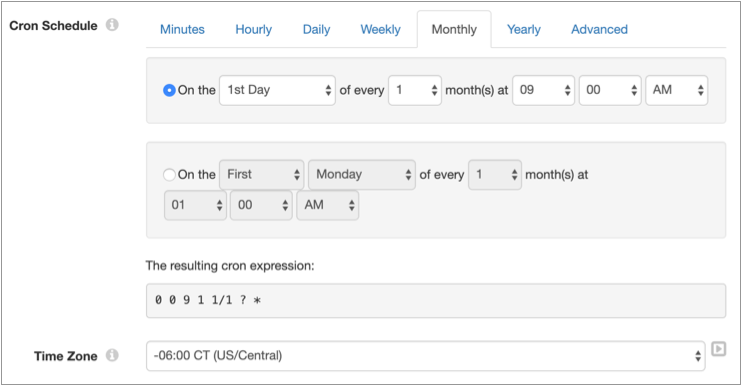
For example, the following image shows a configuration that generates records on the first day of every month at 9 AM in the Central time zone in the United States. The UI shows the read-only cron expression produced by the UI configuration.
- Manually Entered Expressions
- Select the Advanced tab and enter a cron expression
directly. The fields in the cron expression can contain any of the following
allowed values:
Field Mandatory Allowed Values Seconds yes 0-59 Minutes yes 0-59 Hours yes 0-23 Day of month yes 1-31 Month yes 1-12 or JAN-DEC Day of week yes 1-7 or SUN-SAT Year no empty, 1970-2099 Each field can also contain various combinations of special characters allowed in the field. For example, the asterisk (*) special character can be used in all fields to represent all values within the field.
For a list of the special characters allowed in each field and for example expressions, see the Quartz Scheduler documentation.
Configuring a Cron Scheduler Origin
Configure a Cron Scheduler origin to generate records as scheduled by a cron expression. The Cron Scheduler origin is an orchestrator stage.